Understanding multimodal AI explained in simple, human terms is the best way to see why artificial intelligence is suddenly feeling much more like a natural human conversational partner.
Have you ever asked an app to describe a vacation photo, translate spoken audio on the fly, or extract data from a scanned PDF bill? If so, you have already interacted with multimodal technology without realizing it.
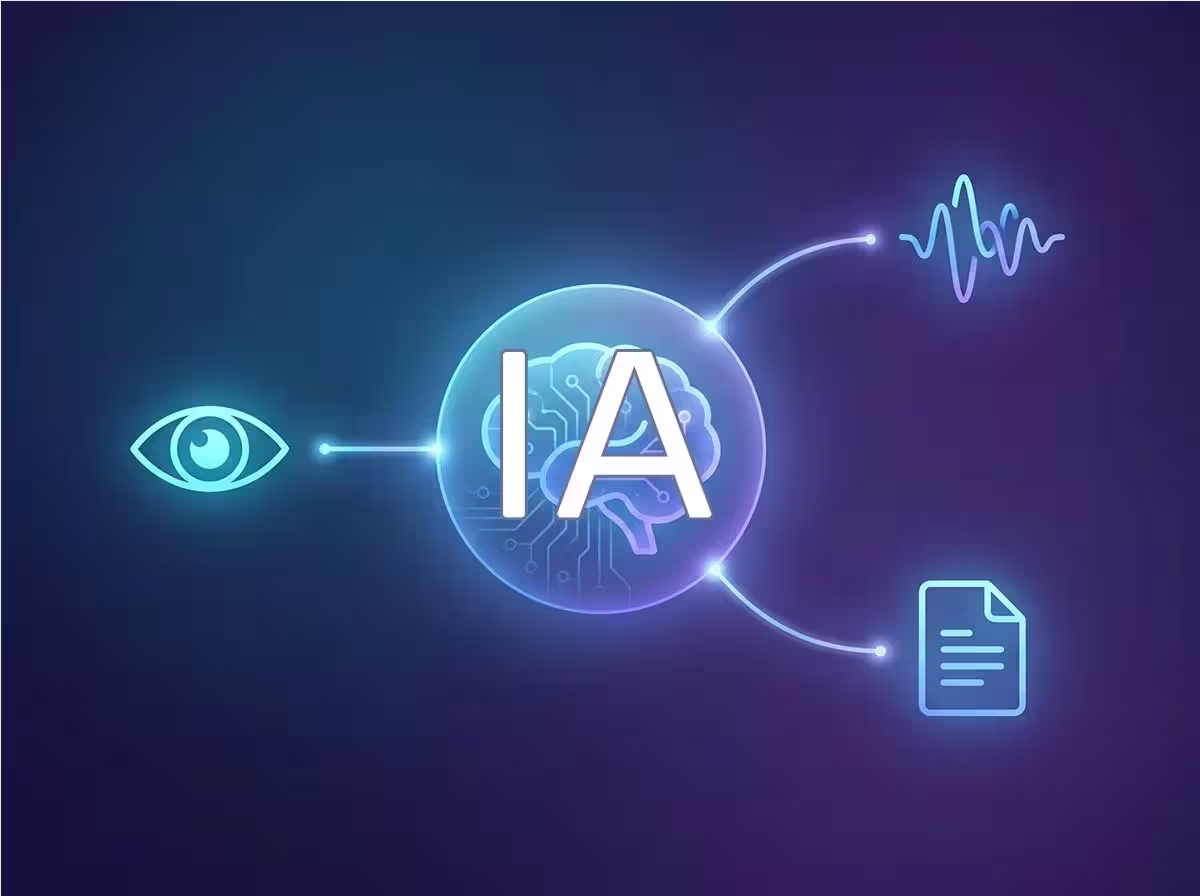
Unlike early language bots that operated strictly on plain typed text, modern systems can now perceive images, analyze audio streams, and interpret video sequences simultaneously—functioning as though they possess interconnected senses working in tandem.
In this guide, we break down how these perceptual models operate under the hood, explore popular real-world tools, provide copy-and-paste prompts, and show you how to start leveraging this technology today.
What Is Multimodal AI and Why Does It Represent a Major Breakthrough?
At its core, multimodal artificial intelligence is an architecture capable of processing, synthesizing, and reasoning across multiple data modalities at the exact same moment.
Think about how humans naturally hold conversations: when you speak with a friend, you do not just listen to dictionary definitions. You observe facial micro-expressions, interpret voice inflection, notice hand gestures, and read contextual surroundings. Consequently, your understanding of the message is far richer than if you simply read a raw typed transcript.
By contrast, traditional unimodal systems can only parse a single data type. A classic search engine indexer only reads text, while an older computer vision model only flags bounding boxes around cars. The arrival of integrated vision and audio models represents a monumental qualitative leap for daily productivity.
How Multimodal AI Explained Works in Real Daily Applications
Under the surface, these neural networks utilize specialized perceptual encoders trained on vast corpora of imagery, waveforms, and text embeddings. An alignment layer maps these diverse sensory representations into a shared semantic vector space, allowing the model to bridge visual and verbal concepts seamlessly.
For example, if you snap a photo of a restaurant dish and ask, “How many calories are in this meal and how can I recreate it with less sodium?”, the system identifies the ingredients visually, estimates portion sizes, and synthesizes that visual input with nutritional databases to produce an actionable answer.
“The transition from text-only models to multimodal architectures mirrors how human intelligence evolves: true reasoning requires connecting words to visual reality and physical context.”
— AI Research Overview
Popular Multimodal Tools You Can Test Today
| Tool | Modalities Supported | Primary Practical Use Case |
|---|---|---|
| ChatGPT (GPT-4o / Vision) | Text, Images, Audio | Visual troubleshooting, document analysis, voice chats |
| Google Gemini | Text, Images, Audio, Video | Multitasking assistant, code debugging from screenshots |
| Claude 3.5 Sonnet | Text, Images, Documents | Complex architectural charts, technical schematics |
| OpenAI Whisper | Audio to Text | Meeting minutes transcription, lecture captions |
Step-by-Step: How to Experiment with Multimodal Workflows
You do not need any coding background or technical degree to start taking advantage of cross-sensory tools:
1. Select an accessible vision-enabled assistant: Open ChatGPT, Google Gemini, or Claude in your web browser or official mobile app. Look for the paperclip or camera icon inside the chat interface.
2. Upload an image alongside a specific inquiry: Photograph a recipe card, plant leaf, mechanical part, or financial dashboard. Instead of simply asking “what is this?”, supply clear context such as: “Analyze this quarterly sales graph and identify which product line suffered the biggest margin drop.”
3. Test natural audio prompting: Enable voice conversation mode on your mobile app and explain a business problem verbally while walking. The model transcribes, processes nuance, and replies naturally in real time.
4. Combine visual and textual constraints: Feed an error message screenshot along with your system specifications to receive targeted code fixes without having to manually retype cryptic logs.
Ready-to-Use Prompts for Multimodal Testing
Try pasting these exact prompt templates alongside your images:
"Analyze this technical flowchart screenshot. Identify any logical bottlenecks or missing error handling steps, and rewrite them into a clean markdown checklist.""Review this photo of the ingredients inside my refrigerator. Suggest three balanced, healthy dinner recipes I can prepare within 30 minutes without buying additional groceries.""Examine this software terminal error. Explain what caused the exception in plain English, and provide the exact command line flag needed to resolve it."Myths vs. Facts in Multimodal Processing
| Common Myth | Verified Technical Fact |
|---|---|
| “Multimodal systems are strictly for software developers” | Consumer interfaces make image and audio workflows as simple as sending a chat message to a friend. |
| “Vision models possess 100% optical accuracy” | Low lighting, blurred text, and dense handwritten notes can still trigger hallucinations or misread digits. |
| “It is just traditional optical character recognition (OCR)” | Multimodal models synthesize semantic meaning, combining what they see with deep conceptual knowledge. |
Common Pitfalls to Avoid
- Uploading blurry or low-contrast captures: If a human eye struggles to decipher small text or dark shadows in your image, the neural vision encoder will likely guess or hallucinate.
- Sharing confidential credentials or medical scans: Never upload unredacted government IDs, financial statements, or private patient records to public cloud assistants.
- Failing to verify critical numbers: Always spot-check quantitative extractions from balance sheets and receipts against the raw source document.
As documented in research by the MIT Technology Review, blending multiple sensory streams significantly reduces single-modality bias, though rigorous human validation remains essential for high-stakes workflows.
The Horizon: Where Next-Gen Sensory Systems Are Headed

Over the coming seasons, multimodal intelligence will integrate deeply into autonomous robotics, assistive medical diagnostics, smart wearables, and real-time screen-interpreting agents. According to publications from Google AI, building models that perceive the world through sight and sound represents the foundational bridge toward genuine contextual computing.
To dive deeper into related technologies and sharpen your digital skills, explore our detailed guides on what is machine learning and computer use and screen-operating agents.
Frequently Asked Questions (FAQ)
What is multimodal AI explained in simple words?
Multimodal AI refers to artificial intelligence capable of analyzing and connecting different kinds of inputs—such as text, images, audio, and video—at the same time. Instead of only reading text, it can inspect a picture or listen to a voice note to deliver accurate, context-aware answers.
Can I use multimodal assistants for free?
Yes. Platforms like ChatGPT, Google Gemini, and Microsoft Copilot provide free baseline access to image upload and voice conversation capabilities, with higher speed and resolution tiers reserved for premium subscribers.
Does multimodal capability replace specialized human experts?
No. These models act as powerful cognitive co-pilots that accelerate research, draft code, and extract details from visual media, but critical judgment, legal accountability, and strategic choices remain in human hands.
Have you started using image analysis or voice commands in your daily routine? Which task has saved you the most time so far? Share your thoughts and experiments in the comments below!