Mastering AI CAD drafting is no longer a futuristic novelty or a superficial party trick that merely generates flattened JPEG mockups. For architects, civil engineers, and mechanical designers spending countless hours fine-tuning sheets, tools like CADCraft paired with the Model Context Protocol (MCP) represent a seismic paradigm shift: an intelligent copilot that calculates exact Cartesian coordinates, manages layers, and produces 100% native, fully editable .dxf and .dwg files directly on your workstation.
For years, design professionals viewed generative AI with a blend of curiosity and healthy skepticism. A stunning visual rendering generated by Midjourney cannot be submitted to city zoning boards, does not encode precise millimeter wall tolerances, and certainly cannot perform structural load-bearing calculations.
The turning point is not generative imagery—it is native CAD command execution. In this practical, in-depth guide, you will discover how this technical bridge operates under the hood, how to transform your firm’s legacy templates and block libraries into an autonomous design engine, and the non-negotiable quality controls needed to ensure digital speed never compromises on-site structural integrity.
The Chasm Between Flat Pixels and Real Vector Geometry
To understand why CADCraft has sparked intense enthusiasm across engineering communities, we must distinguish between raster generation and parametric drafting. The initial wave of design AI operated purely in the pixel domain. Prompting a model for a “contemporary two-bedroom floor plan” produced a flat bitmap image.
If an interior partition measured 5 inches instead of the mandatory 6 inches required for plumbing chases, there was no way to grab a vertex, invoke a stretch command (STRETCH), or adjust an associative dimension. The file was functionally dead. You had to draft the entire blueprint from scratch in AutoCAD or Revit, rendering the AI little more than a mood board generator.
CADCraft, engineered by software developer Brandon Thomas and built entirely from scratch in high-performance Rust, lives on the opposite side of the spectrum. It does not output colored pixel arrays. Instead, it serves as a full-fledged, autonomous CAD engine capable of parsing analytical geometry, Cartesian vectors, radii, tangencies, polylines, and standard DXF entity structures.
When an AI agent operates inside CADCraft, the deliverable is a living technical document. Every line possesses distinct mathematical start and end points, every circle has a calibrated radius, and every text label is anchored to spatial coordinates—identical to what an experienced draftsman produces via command-line prompts.
“On a job site or in precision CNC manufacturing, a drawing is not a subjective piece of art. It is a legally binding, mathematically rigorous technical specification. AI only becomes genuinely valuable in engineering when it stops painting pictures and starts driving millimeter vectors.”
— Editorial Note, Minha Dose de IA
Under the Hood: How the MCP Protocol Connects AI to the CAD Engine
The technical breakthrough behind this integration is the protocol connecting the large language model to the desktop software. CADCraft natively bundles an embedded server for the Model Context Protocol (MCP), an open standard introduced by Anthropic that allows AI agents to interface directly with local utilities, file systems, and development tools.
MCP acts as a universal socket for autonomous tool use. Rather than requiring users to manually copy generated AutoLISP code, open AutoCAD, execute APPLOAD, run scripts, and troubleshoot syntax errors, CADCraft’s MCP server exposes real-time drafting functions directly to the agent.
When connected, the MCP server provides access to 12 dedicated drafting tools that execute in milliseconds:
- command_line: Allows the AI to submit direct commands using classic AutoCAD syntax (such as
LINE 0,0 10,0 10,5 C,CIRCLE 5,2.5 1, orOFFSET 0.15), responding dynamically to interactive command-line prompts. - execute: Runs structured JSON payloads for mathematical precision, such as configuring custom layer palettes, rotating component groupings, or enforcing geometric constraints.
- query_entities & inspect_drawing: Enables the model to audit the active drawing, query coordinates, confirm closed boundary polylines, and tally physical schedule elements like doors or structural columns.
- render: Instantly renders the active drawing into a high-resolution PNG image in the background, allowing the agent to visually inspect its work before delivering the final CAD file.
This architecture aligns directly with the concepts explored in our analysis of Computer Use and autonomous UI agents: software tools are evolving from passive text interfaces into active copilots executing domain-specific desktop commands.
The Firm’s Secret Weapon: Feeding AI Your Own Layer Standards and Block Libraries
This is where the vast majority of practitioners fail: they open an AI chat and prompt “draw a modern 1,800-square-foot house plan.” The resulting output is invariably generic, filled with nonsensical layer names, erratic line weights, and zero alignment with your firm’s professional drafting standards.
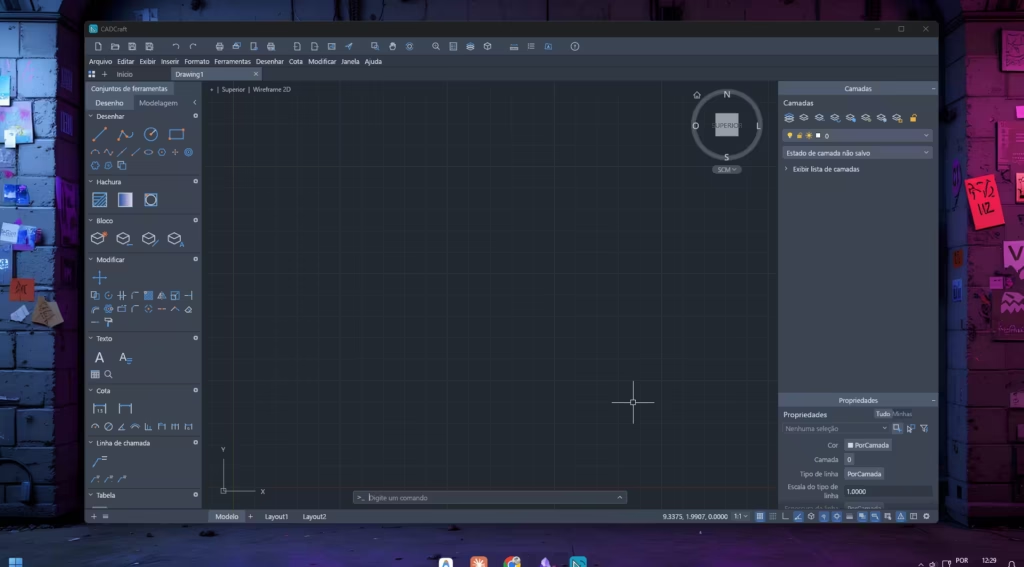
Any practicing architect or engineer has spent years refining a valuable repository: organized folders containing standard furniture and plumbing blocks, .dwt template files with custom pen assignments, sheet borders (Arch D, 24×36), and strict layer naming conventions.
To ensure AI CAD drafting matches your office’s signature visual identity, you must provide this structured context as a project specification document. By attaching a clean Markdown or text file outlining your firm’s guidelines, the agent drafts within your exact professional parameters from the first line.
Here is an architectural standards template you can adapt and store in your project workspace:
# ARCHITECTURAL DRAFTING STANDARDS SPECIFICATION

## 1. DRAWING UNITS & SYSTEM
- Base units: Decimal Feet or Metric Meters (specify per project).
- Angle orientation: Decimal degrees, counter-clockwise (0° = East / Right).

## 2. MANDATORY LAYER HIERARCHY
- A-WALL-EXTR: Color 7 (White), LineWeight 0.50mm (Exterior load-bearing walls, t=8").
- A-WALL-INTR: Color 1 (Red), LineWeight 0.35mm (Interior partitions, t=4.5").
- A-DOOR: Color 4 (Cyan), LineWeight 0.18mm (Door leaves, frames, and swing arcs).
- A-GLAZ: Color 3 (Green), LineWeight 0.25mm (Window frames, sills, and glass panes).
- A-DIMS-PLAN: Color 2 (Yellow), Text style "ARCH-STANDARD", Text height 0.12'.
- A-FLOR-PATT: Color 8 (Dark Gray), LineWeight 0.09mm (Wet area hatching and tile grids).

## 3. CODE & CLEARANCE MANDATES
- Minimum ceiling height: 9'-0" in primary spaces; 8'-0" in bathrooms and utility rooms.
- Minimum clear door widths: Bathrooms (2'-6"), Bedrooms (2'-8"), Entry (3'-0").
- All room boundary perimeters must maintain "Closed = True" for automated area takeoff scheduling.
When your AI agent is seeded with these parameters, it no longer has to guess your drafting style. It creates the designated layers, assigns the correct pen weights, and ensures the exported drawings integrate seamlessly into your sheet sets and plot configurations, eliminating hours of post-drafting cleanup.
Crafting Engineering Prompts: The Line Between Success and Costly Errors
In technical drafting, output precision is strictly a function of input structure. A CAD automation prompt must read like a preliminary project program or specifications brief rather than a casual conversational query.
If you fail to define mandatory boundary setbacks, the model will position elements arbitrarily. If you omit an explicit coordinate origin point (0,0), spatial alignment with civil surveys and structural grid lines is lost. As we examined in our guide on AI in construction scheduling and cost estimation, providing structured boundary conditions is the only way to achieve repeatable engineering outcomes.
Below is a field-tested prompt template designed for automated parametric floor plan layout generation:
Act as a Senior CAD Technician specialized in CADCraft and AutoCAD drafting syntax.

Refer to the Architectural Drafting Standards provided in the project workspace and execute the following sequential workflow in a new drawing session:

1. SESSION INITIALIZATION:
   - Establish all required project layers (A-WALL-EXTR, A-WALL-INTR, A-DOOR, A-GLAZ, A-DIMS-PLAN).
   - Set A-WALL-EXTR as the active layer.

2. BOUNDARY GEOMETRY (Insertion origin: 0.00, 0.00):
   - Draft the exterior building footprint: a 26'-0" wide by 40'-0" long rectangular envelope.
   - Execute an inward OFFSET of 8" (0.67') to delineate exterior structural wall thickness.

3. SPATIAL PARTITIONING (Switch active layer to A-WALL-INTR, wall thickness 4.5" / 0.38'):
   - Partition the interior volume into three dedicated functional zones:
     a) Great Room (Living/Dining/Kitchen): 26'-0" x 16'-0" spanning the front elevation.
     b) Primary Bedroom Suite: 13'-0" x 15'-0" in the rear-left quadrant.
     c) Bedroom 2: 12'-4" x 12'-0" in the rear-right quadrant.
     d) Primary Bath (8'-0" x 5'-6") and Powder Room (7'-6" x 5'-0") adjacent to central circulation.

4. OPENINGS & FENESTRATION:
   - Trim interior wall intersections clean using the TRIM command.
   - Insert 2'-8" bedroom door openings and 2'-6" bathroom door swings on layer A-DOOR.

5. VERIFICATION & EXPORT:
   - Place exterior baseline dimension strings on layer A-DIMS-PLAN.
   - Perform a ZOOM EXTENTS operation and render a preview PNG image to verify geometry.
   - Save the completed drawing as a native DXF file named "schematic_residential_module.dxf".
Real-World Benchmark: From Antigravity Prompt to Native AutoCAD 2026 DXF
To move beyond theoretical discussions and evaluate how this workflow performs under rigorous technical conditions, we ran a live benchmark test pairing Google Antigravity directly with CADCraft’s MCP server. We intentionally engineered the most challenging testing condition: a strict “cold start” evaluation using synthetic dimensional data, conducted without any prior agent conditioning, fine-tuning, or pre-loaded proprietary office block libraries.
The core research question was straightforward: can an autonomous AI agent interpret a complex architectural spatial program in natural language, orchestrate Cartesian drafting commands, and deliver a clean, geometrically valid, production-ready DXF file that opens flawlessly in industry-standard software? Here is the documented step-by-step benchmark:
1. Autonomous AI in Action: Real-Time Reasoning, Layers, and Vector Synthesis
Unlike raster image generators that attempt to guess visual compositions in a single blind generation pass, the agent inside Antigravity operates methodically like a junior draftsman at the workstation. It breaks the project into deterministic geometric steps: establishing the global Cartesian origin (0,0), declaring AIA-standard layer hierarchies with designated colors and lineweights, and calculating exterior wall boundaries.
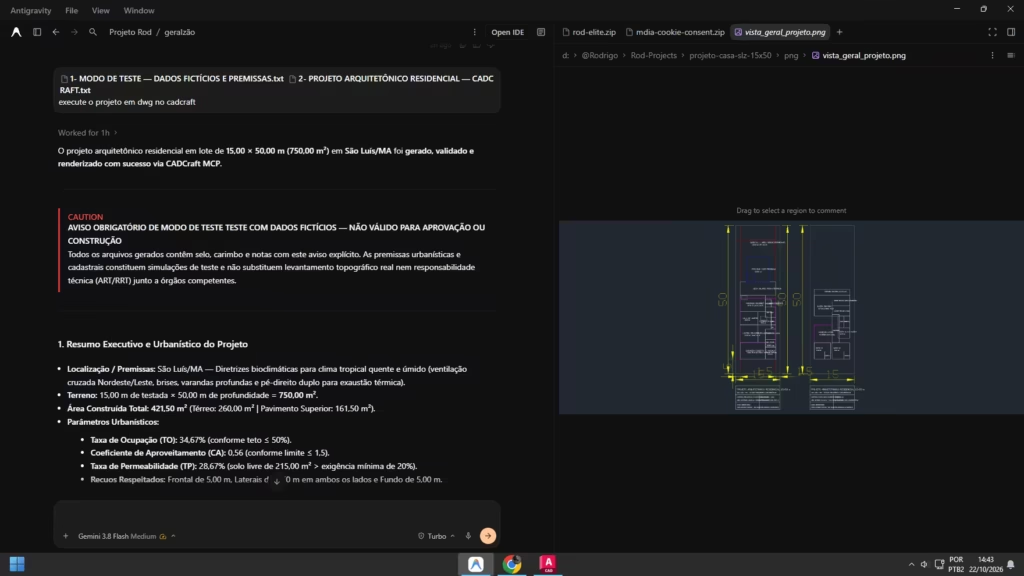
During the intermediate drafting phases, the agent dynamically invoked CADCraft’s native drafting toolset: plotting interior partition offsets, calculating clean wall junctions, and carving out precise door and window rough openings without coordinate hallucinations.
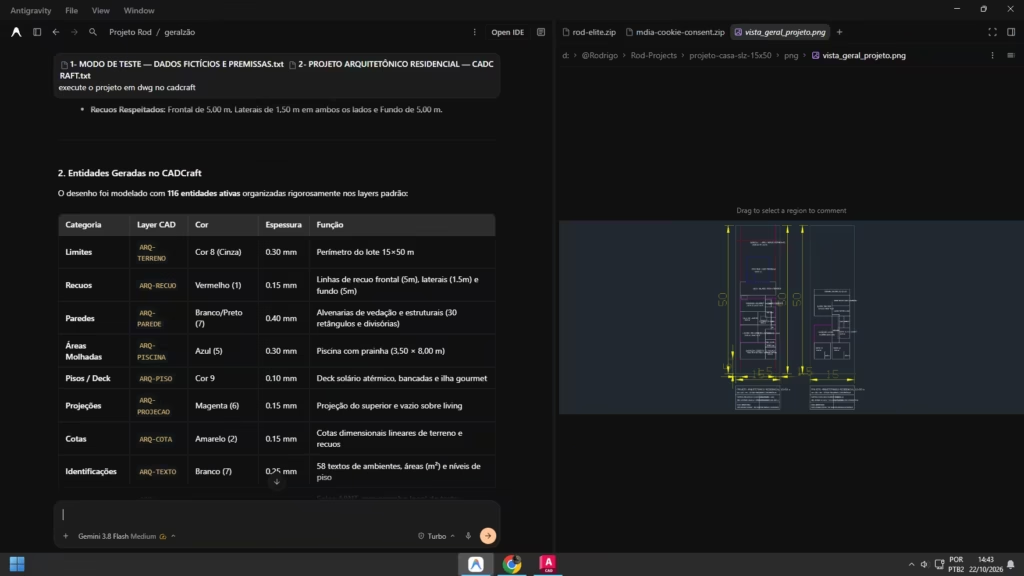
Once the floor plan geometry was completed, the agent triggered an automated zoom extents operation (ZOOM EXTENTS), positioned room identification labels with technical text tied to exact room centers, and validated boundary closures before committing the file to disk.
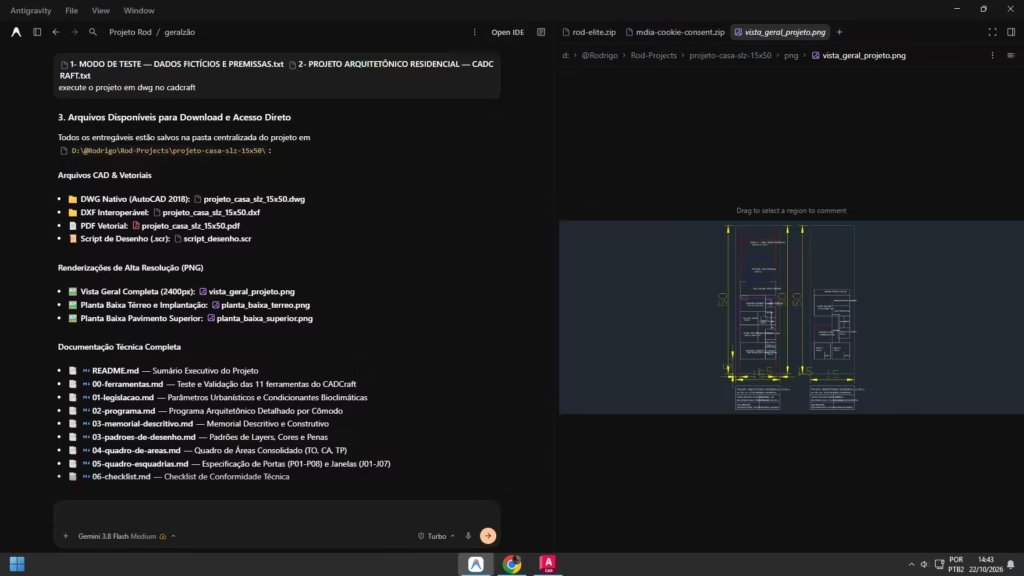
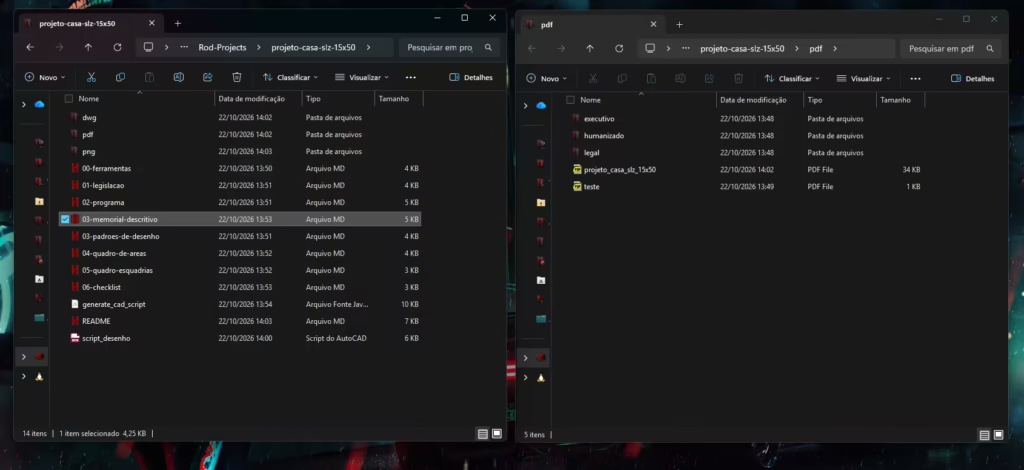
2. Localized Workspace Organization and Deliverables
One of the major architectural benefits of CADCraft is that zero proprietary data leaves your machine. Upon finishing the drafting sequence, the AI agent organized the deliverables directly in a structured project directory on the local hard drive, containing the compiled DXF file, geometric execution logs, and high-resolution raster previews for rapid visual sign-off.
3. The Litmus Test: Native CADCraft Rendering and AutoCAD 2026 Interoperability
Writing a file with a .dxf extension is simple; the decisive test is whether that file opens cleanly in enterprise CAD environments without corrupted entities, inverted normals, or missing layer tables. To test this, we subjected the generated file to a dual-application verification:
First, we inspected the drawing within CADCraft’s native interface. As seen in the screen capture below, the Rust-powered vector engine rendered crisp, closed polylines, accurate wall thicknesses, and perfect spatial proportions adhering strictly to our prompt parameters:
“One of the most impressive things is just how fast CADCraft loads and how smooth it feels…”
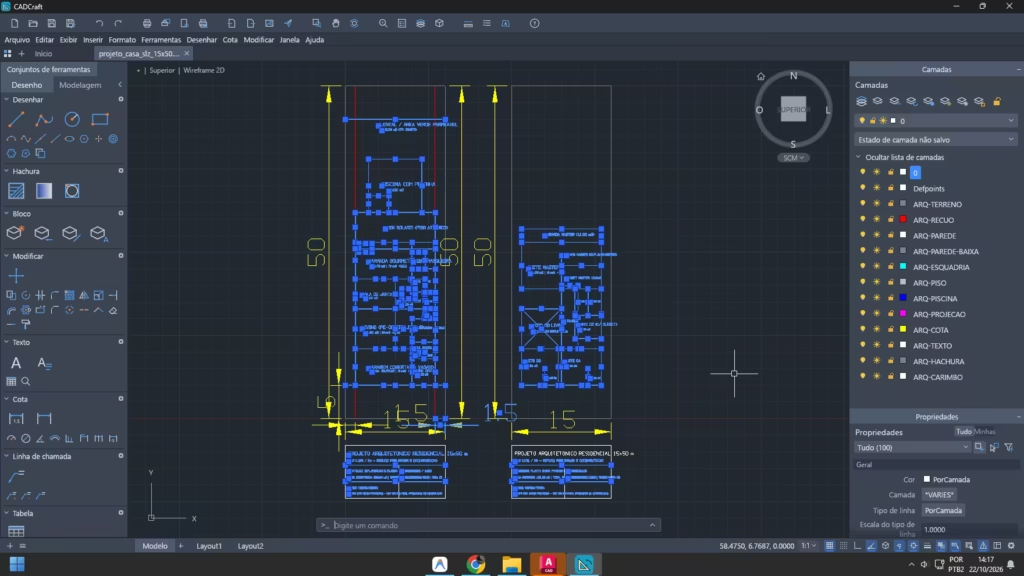
Next came the ultimate industry benchmark: opening the identical DXF file inside Autodesk AutoCAD 2026. The interoperability was seamless. The drawing loaded instantly as an active, native CAD document: every partition was an independently selectable polyline, layer names and line properties were fully preserved, and dimensions snapped accurately to Cartesian intersections—ready for immediate human detailing, sheet sets, and construction documentation:
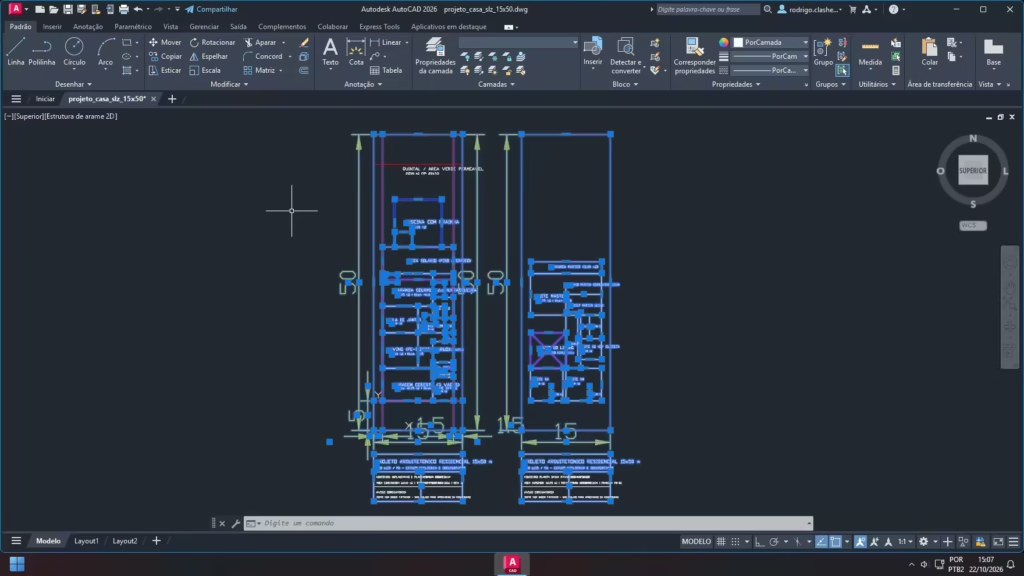
This benchmark substantiates an invaluable reality for modern architects and engineers: even on a zero-context cold start, AI connected via MCP is fully equipped to eliminate the tedious hours spent drafting initial schematics from scratch. When you connect this workflow to your firm’s standardized block libraries and title block templates (as detailed in the preceding section), productivity gains reach an entirely unprecedented scale.
Pros and Cons: Where Automation Excels and What Remains Strictly Human
Deploying tools like CADCraft connected to AI agents yields transformative speed, but technical leaders must evaluate the trade-offs with unvarnished clarity.
Key Strengths:
- Unmatched Velocity in Schematic Feasibility: Generating multiple spatial layouts with calculated square footages and dimension strings takes minutes rather than a full billing day.
- 100% Open, Unlocked Native Files: Unlike proprietary cloud drafting tools that lock project assets behind subscription walls, CADCraft operates entirely locally on your workstation, outputting standard DXF and DWG formats.
- Elimination of Repetitive Drafting Drudgery: Laying out repetitive structural grids, parking stall renumbering, basic partition offsetting, and sheet annotation are offloaded seamlessly.
- Extensible Open-Source Foundation: Written in Rust and supported by clean-room reverse engineering principles (as explored in our deep-dive on AI reverse engineering in software development), the engine facilitates custom scripting and legacy file migrations.
Critical Constraints and Risks:
- Professional Liability Cannot Be Automated: No algorithm holds a professional engineering license (PE) or AIA stamp. Structural validation, life-safety egress compliance, and local municipal building codes remain the personal legal responsibility of the licensed practitioner.
- Micro-Geometric Snapping Errors: If an automated
TRIMorEXTENDcommand miscalculates due to an ambiguous prompt prompt, intersecting vertices may fail to close by a fraction of an inch, preventing automatic boundary area calculations or solid extrusion. - Interdisciplinary Coordination Demands Human Oversight: An AI agent may draft a structural grade beam through the exact spatial coordinates reserved for an underground sanitary sewer main. Cross-disciplinary clash detection requires human discernment.
The Evolving Role: From Production Draftsman to Principal Design Director
Connecting artificial intelligence directly to native CAD command lines does not foreshadow the obsolescence of architects or engineers. Rather, it accelerates the transition of technical professionals from production draftsmen into high-level design directors and systems coordinators.
The mental energy previously expended nudging dimension ticks, managing layer purges, and manually offsetting wall lines can be redirected where clients derive genuine value: passive environmental performance, resilient material selection, value engineering with contractors, and creating spaces that enrich human life.
Artificial intelligence will not replace architects and engineers who command deep domain fundamentals. But professionals who leverage local CAD engines, the Model Context Protocol, and rigorous technical prompting will undoubtedly outpace those who manually draft every polyline as if the digital landscape had never evolved.
Frequently Asked Questions (FAQ)
What is CADCraft and is it open source?
CADCraft is an open-source 2D and 3D computer-aided drafting engine written in Rust by developer Brandon Thomas (as part of the ArtCraft suite). It serves as a fast, independent, subscription-free alternative to commercial CAD packages, providing native DXF and DWG format interoperability.
Can files created with CADCraft be opened in commercial AutoCAD?
Yes, completely. Files saved in standard .dxf or .dwg formats use universal CAD geometric entities. Opening the file in AutoCAD, Civil 3D, or Revit preserves all layers, line types, blocks, and dimensions as standard editable vector elements.
Can AI convert scanned PDF blueprints into clean CAD geometry?
Yes, through multimodal hybrid workflows: a computer vision model reads dimension annotations and spatial relations from the raster PDF, and subsequently transmits precise geometric commands to the CADCraft MCP server to draft a clean vector model from scratch.
Is it safe to use CADCraft for proprietary or NDA-protected client projects?
A primary architectural benefit of CADCraft is that the core application and its MCP server execute 100% locally on your computer. When paired with local models or enterprise APIs that do not train on customer inputs, no sensitive drawings or confidential site data ever leave your hardware.
In your day-to-day practice: are you spending more time manually drafting repetitive linework or solving high-level engineering challenges? How do you see autonomous CAD workflows transforming your studio? Share your thoughts and questions in the comments below!