
Few workplace rites are as universally dread-inducing as opening PowerPoint at 9:00 PM the night before a major executive briefing. You stare at a barren white slide, agonizing over bullet points, dragging text boxes by three pixels, and hunting through stock photo libraries for generic corporate handshakes. By the time midnight arrives, you have spent 80% of your energy on mechanical formatting and barely 20% on the core persuasive narrative.
The traditional slide deck creation process is structurally broken. When you create AI presentations using modern generative workflows, you invert that exhausted equation entirely. Instead of fighting layout margins, you feed raw strategic outlines into neural presentation engines that handle layout mathematics, typography hierarchies, and visual cards in under ninety seconds.
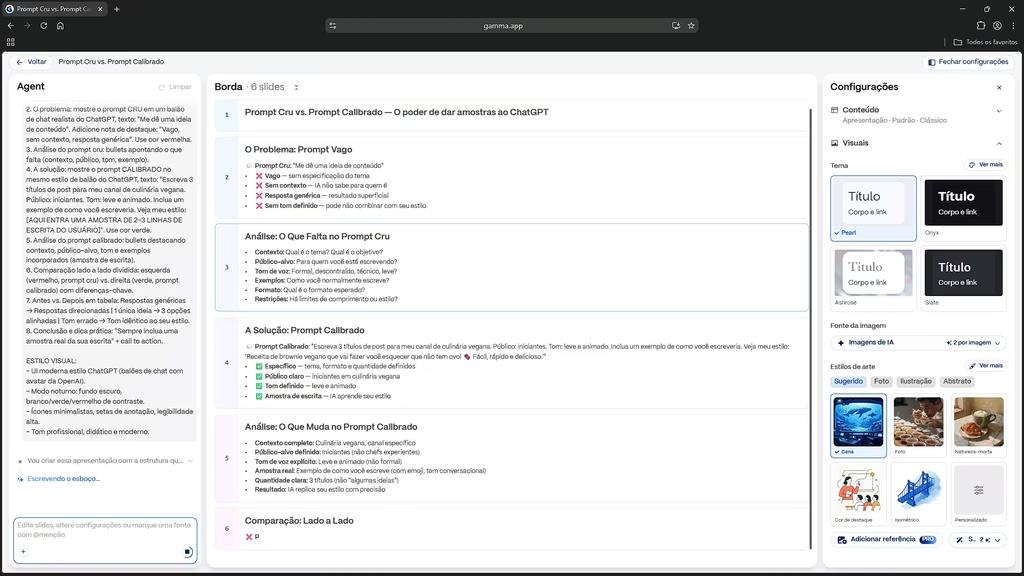
The Anatomy of a Bad Slide: Escaping the Cognitive Clutter Trap
Why do most corporate decks fail to persuade? Presentation designers identify three fatal mistakes: the wall of text, decorative clip art, and the lack of narrative hierarchy. When a presenter pastes sixty words of bullet points onto a screen, the audience’s brain experiences cognitive dissonance—they cannot read your slide and listen to your voice simultaneously.
According to cognitive load research published by the Harvard Business Review, visual slides should function as emotional billboards that anchor speech, not teleprompters. AI generative tools enforce this discipline automatically by condensing rambling paragraphs into high-impact cards, stat counters, and visual comparisons.
The 3-Stage Generative Workflow
To produce presentations that command boardroom attention rather than looking like automated spam, execute this battle-tested 3-stage pipeline:
- Stage 1 (Narrative Architecture): Use ChatGPT or Claude to structure a compelling 7-slide storytelling arc based on the classic Problem-Agitation-Solution framework.
- Stage 2 (Algorithmic Layout & Rendering): Feed the structured markdown outline into dedicated AI tools like Gamma App or Beautiful.ai for instant typography and card generation.
- Stage 3 (The Human Polish): Replace automated placeholder imagery with authentic data charts, proprietary screenshots, and calibrated brand colors.
Stage 1: The Master Storytelling Prompt
Never ask an AI slide generator to brainstorm your topic from scratch. Start in an LLM like Claude 3.5 Sonnet to craft an airtight narrative spine. Use this specialized prompt from our editorial library:
Act as a world-class venture capital pitch deck advisor and keynote speechwriter.
I need to create a high-stakes 8-slide presentation on [TOPIC / PRODUCT].
Target Audience: [C-LEVEL EXECUTIVES / INVESTORS / TEAM MEMBERS].
Core Goal: [CONVINCE THEM TO APPROVE $50K BUDGET / ADOPT NEW SOFTWARE].

Structure the output into exactly 8 slides using this strict schema for each slide:
- Slide Number & Title (Punchy, 4-6 words maximum)
- One Single Core Message (The big takeaway sentence)
- Key Supporting Points (Max 3 bullet points, under 12 words each)
- Suggested Visual Concept (A clean diagram, comparative metric, or chart)

Here is my raw context and data:
[Paste messy notes or meeting summary]
Within seconds, you possess a clean, structured manuscript ready for algorithmic rendering.
Stage 2: The Best Tools to Create AI Presentations
Not all presentation platforms are built equal. Here are the three leading engines tested across our workflow:
1. Gamma App: The Undisputed King of Fluid Cards
Gamma App completely reinvents the rigid 16:9 slide paradigm. Instead of forced boundaries, Gamma treats slides as flexible digital cards and responsive web pages. You paste your markdown text, select a sleek dark aesthetic, and it automatically formats responsive columns, timelines, and metric cards in under sixty seconds. You can export to PDF or PowerPoint with a single click.
2. Beautiful.ai: Mathematical Design Guardrails
If you must stay within traditional corporate branding, Beautiful.ai uses rule-based design mathematics. As you add a fourth bullet point or adjust a chart, the layout recalculates whitespace dynamically so that your slides never look cluttered or misaligned.
Direct Comparison: Choosing Your Presentation Engine
To select the right tool for your specific workplace constraints, compare their operational strengths:
| Platform | Best Use Case | Standout Feature | Export Support |
|---|---|---|---|
| Gamma App | Modern pitch decks, briefs, client docs | Fluid web cards, interactive embeds | PDF, PPTX, Web Link |
| Beautiful.ai | Strict corporate brand compliance | Automated layout mathematics & grids | PPTX, PDF, Google Slides |
| Microsoft Copilot | Enterprise Office 365 environments | Generates slides directly from Word docs | Native PowerPoint (.pptx) |
Stage 3: The 10% Human Touch That Closes the Deal
AI gives you an exceptional 90% foundation in two minutes. But presenting raw AI output without human calibration will instantly hurt your credibility. Execute these three essential finishing touches:
- Audit Numerical Metrics: LLMs can hallucinate statistical figures or trend percentages. Always verify that market sizes and financial projections match your real spreadsheets. Learn how to verify spreadsheet data with our guide on Automating Excel & Sheets with AI.
- Replace Stock Imagery: AI generators often pick generic robotic hands or glowing crystal brains. Replace them with actual product screenshots, customer headshots, or genuine architecture schematics.
- Enforce the 5-Second Breath Rule: Look at each slide for five seconds. If your eyes do not immediately land on the primary focal point, delete half of the supporting elements. Whitespace is your greatest ally.
To take your practical workflow further, explore our hands-on guide on how to create shareable posts and presentations with AI.
Frequently Asked Questions
Can I edit my presentation in PowerPoint after generating it in Gamma?
Yes. Gamma App allows complete export to editable .pptx files. Text blocks, geometric shapes, and imagery remain fully editable objects in Microsoft PowerPoint or Google Slides.
Do AI presentation tools support custom enterprise typography and brand colors?
Both Gamma Pro and Beautiful.ai offer robust custom branding suites where you can upload custom OTF/TTF fonts, define primary hex color palettes, and insert locked enterprise logo headers.
Is the free version of Gamma enough for regular business presentations?
Gamma provides generous initial free generation credits that allow you to produce several complete decks. For high-volume weekly creation, custom domain hosting, and unlimited AI regeneration, the Plus or Pro subscription is well worth the operational time saved.
Reclaim Your Evenings from PowerPoint Hell
Life is too short to spend three hours formatting bullet points and aligning rectangle borders at midnight. By offloading design friction to generative engines, you can focus on what truly moves minds: sharp ideas, clear arguments, and authentic human connection. Have you tested Gamma or Copilot for your recent presentations? Drop your thoughts, favorite templates, and questions in the comments below!