It is 5:00 PM on a brisk Thursday afternoon when an urgent calendar invite lands in your inbox: tomorrow morning at 9:00 AM sharp, executive leadership or that multi-million-dollar prospect expects a comprehensive presentation deck complete with operational diagnosis, financial benchmarks, and a strategic roadmap. You fire up traditional presentation software, stare blankly into the cold white void of an empty 16:9 canvas, and feel that familiar knot tighten in your stomach. Over the next four agonizing hours, instead of honing your core narrative or rehearsing persuasive arguments, you find yourself trapped in layout purgatory: wrestling with misaligned text boxes, hunting down pixelated stock icons, and attempting to compress complex strategies into snooze-inducing bullet points. In corporate culture, this universal ordeal is known by a notorious name: Death by PowerPoint.
The uncomfortable reality is that conventional slide software was conceived in the mid-1980s, an era when overhead acetate transparencies and physical slide carousels dictated meeting dynamics. While the global workplace has moved into the frontier of large language models, hybrid teams, and dynamic interactive displays, professionals still squander up to 70% of their preparation time adjusting margins and font weights rather than sharpening their core thesis. This is precisely why modern AI presentations have fundamentally disrupted the corporate landscape.
Among the new crop of generative productivity platforms, none has engineered a more profound breakthrough than Gamma App. Rather than forcing creators to cram thoughts into rigid, static slide templates, Gamma reimagined presentation mechanics entirely: it turns messy bullet points, meeting transcripts, or strategic briefs into dynamic, beautifully styled, and responsive cards in under five minutes. In this definitive guide, you will master the art of generating high-impact AI presentations without any background in graphic design, discover battle-tested executive prompts for high-stakes meetings, and equip yourself with the essential stage hardware to deliver presentations that win the room.
The Manual Design Trap: Why Formatting Slides Drains Your Strategic Edge
In fast-paced business environments, sharp conceptual thinking and speed of execution separate top performers from everyone else. Yet, when you spend three consecutive hours choosing color schemes, nudging margin guidelines, and preventing financial charts from colliding with footers, your brain succembers to severe cognitive decision fatigue. By the time you step up to present—whether across a boardroom table or on a Zoom video conference—your creative battery is depleted, leaving zero reserve for emotional intelligence, audience reading, or articulate objection handling.
Presentation design luminary Garr Reynolds, author of Presentation Zen, frequently underscores that the primary function of a visual deck is never to serve as a teleprompter for the speaker, but rather to act as an emotional and visual amplifier of the spoken narrative. When a slide is overloaded with twelve lines of dense text, your audience immediately stops listening to your voice and begins reading the screen. Because human silent reading speed is nearly three times faster than normal speaking cadence, your listeners finish digesting the slide before you complete your opening premise, severing connection and authority.
“People who know what they’re talking about don’t need PowerPoint to prove their point. Slides are there to support the ideas, never to replace them.”
Steve Jobs
When you adopt a modern workflow powered by AI presentations, that dynamic inverts completely. Instead of starting with color pickers and empty geometric boxes, you begin with what truly drives commercial outcomes: the logical architecture of your argument. Artificial intelligence shoulders the manual labor of typography hierarchy, harmonious spacing, and layout synthesis in seconds, returning complete control over your most valuable professional asset: strategic preparation time.
Why Gamma App Reimagined Corporate AI Presentations from the Ground Up
Unlike legacy software suites that merely bolted superficial chatbot plugins onto thirty-year-old desktop engines, Gamma App was engineered from the foundation around fluid content cards. This structural shift transforms how audiences consume and how creators build AI presentations:
- Responsive, Fluid Card Architecture: Rather than forcing content into rigid horizontal containers, Gamma cards expand dynamically based on information depth, rendering effortlessly on boardroom projectors, laptop displays, and vertical mobile screens alike.
- Live Interactive Media Embeds: You can embed interactive data sheets, expandable accordions, YouTube videos, Typeform surveys, live Figma canvases, and dynamic financial widgets directly into the deck, eliminating clumsy window toggling during live client pitches.
- Algorithmic Design Systems: Switching your entire deck’s aesthetic requires a single click. Gamma instantly recalculates type scales, contrast ratios, card margins, and data palettes across every slide without breaking formatting or alignment.
- Frictionless Export Without Lock-In: While Gamma shines as a live, trackable web link offering detailed per-card reader analytics, you can instantly export pristine print-ready PDFs or fully editable Microsoft PowerPoint (.pptx) files for traditional stakeholders.
For professionals exploring our latest frameworks on modern AI workflows and productivity systems, Gamma feels like a generational leap forward. The technical barrier dissolves: you do not need to understand graphic design theory, grid alignment, or Photoshop masking to produce deliverables that rival elite management consulting decks.
The 5-Minute Masterclass: From Raw Prompt to Complete AI Presentations
Building executive-caliber AI presentations in Gamma App does not require specialized technical expertise, but it demands deliberate prompting. When someone enters a generic prompt such as ‘make a sales presentation’, the AI responds with bland corporate boilerplate. The secret to building stellar AI presentations lies in a disciplined three-step execution framework:
Step 1: Architecting the Directional Prompt
Upon logging into Gamma, click ‘Create New with AI’ and choose ‘Generate’. The platform lets you select between a Presentation (Slides), an interactive Document, or a Webpage. Select ‘Presentation’ and specify your initial card count (8 to 10 cards represents the optimal baseline for executive business meetings).
In the instruction box, do not settle for a basic topic sentence. Provide business context, target audience personas, the core problem being solved, and the ultimate call-to-action. Below are three production-ready prompt templates engineered for your day-to-day workflow:
Template 1: B2B Commercial Sales Pitch / Irresistible Closing Deck:
Act as a senior B2B enterprise sales strategist and master of executive corporate storytelling.

Create an 8-card presentation deck in Gamma App designed to pitch our enterprise AI automation software to retail Chief Operating Officers (COOs) and Supply Chain Vice Presidents.

Core Business Context:
- Central Pain Point: Mid-sized to enterprise retailers lose up to 18% of operating margins due to stockouts and outdated dynamic pricing.
- Our Solution: A real-time predictive demand engine that syncs with inventory databases and triggers automated markdown re-balancing.
- Unfair Advantage: Zero-friction integration with legacy ERP systems in under 48 hours with zero upfront setup fees.

Mandatory Structure for the 8 Cards:
Card 1: High-impact title card with a magnetic hook and clear enterprise subtitle.
Card 2: The Invisible Leak: The 3 biggest margin bleed points in physical and omnichannel retail for 2026.
Card 3: The Cost of Inaction: Year-over-year financial loss comparison charts.
Card 4: Predictive Architecture: How our autonomous algorithms forecast demand spikes 14 days ahead.
Card 5: Real-World Case Studies: Verified client data showcasing 34% stockout reduction in 60 days.
Card 6: Rollout Roadmap: A transparent 4-week timeline to measurable first-value milestones.
Card 7: Partnership Model & ROI Calculus: Transparent proof of 90-day payback period.
Card 8: Actionable Next Step: Frictionless CTA to schedule a 14-day dedicated Proof of Concept (POC).

Tone of voice: Executive, analytical, data-driven, persuasive, and completely devoid of empty buzzwords.
Template 2: Executive Quarterly Business Review (QBR) for C-Suite & Board:
You are the Chief Financial Officer (CFO) and VP of Corporate Strategy at a high-growth technology scale-up.

Develop a crisp, 7-card presentation in Gamma App for the quarterly board meeting with venture directors and institutional stakeholders.

Core Q3 Operating Metrics:
- Annual Recurring Revenue (ARR) Growth: +28% YoY.
- Customer Acquisition Cost (CAC): Decreased 15% following AI-driven marketing automation.
- Net Revenue Retention (NRR): 112%.
- Primary Operational Bottleneck: Customer support churn spike during seasonal product launch peak.

Card Breakdown Guidelines:
- Card 1: Executive Dashboard with primary Q3 financial scorecard.
- Card 2: Financial Performance Breakdown: Revenue, Gross Margin, and Cash Runway.
- Card 3: Operational Efficiency: Cost savings generated through automated internal workflows.
- Card 4: Go-To-Market Pipeline: Sales velocity, conversion rates, and enterprise tier expansion.
- Card 5: Operational Watchpoint: Support backlog root-cause analysis and immediate resolution plan.
- Card 6: Q4 Strategic North Star: Resource allocation and core deliverables.
- Card 7: Board Deliberations & Formal Action Items.

Format heavily using clean comparison tables, large callout KPI statistics, and telegraphic bullet points.
Template 3: Interactive Corporate Workshop & Upskilling Masterclass:
Act as an expert instructional designer and senior corporate educator specializing in adult learning (andragogy).

Design an engaging, interactive 10-card presentation in Gamma App for an internal training masterclass titled "Practical AI for Non-Technical Teams: Automate Daily Drudgery Without Code".

Target Audience: Operations, legal, administrative, and HR managers with limited or zero previous technology background.

Key Workshop Objectives:
- Demystify large language models using everyday analogies without engineering jargon.
- Introduce the universal high-performance prompt formula with tangible before-and-after examples.
- Facilitate a live 15-minute hands-on breakout exercise solving real workplace administrative tasks.

Card Progression:
Card 1: Welcome & Learning Contract: What you will comfortably execute by the end of this hour.
Card 2: The Co-Worker Analogy: What AI models truly are (and why they cannot replace human judgment).
Card 3: The True Cost of Busywork: Quantifying hours wasted in email threads and repetitive document summaries.
Card 4: The 4-Part Prompt Architecture: Role + Context + Challenge + Format Constraint.
Card 5: Real-World Case 1: Writing diplomatic, high-stakes client correspondence in 30 seconds.
Card 6: Real-World Case 2: Synthesizing sprawling spreadsheets and 40-page PDF reports instantly.
Card 7: Hands-On Exercise: 15-minute departmental challenge prompt.
Card 8: Essential Corporate Data Privacy & Safe Usage Rules.
Card 9: Curated Toolkit & Continuing Resource Hub.
Card 10: Live Q&A and Instant Session Feedback via embedded QR survey.
Step 2: Theme Selection and Layout Hierarchy
Once you approve the initial card outline, Gamma presents an extensive theme picker. You can choose from modern high-contrast dark themes featuring subtle electric accents, or clean corporate light themes with minimalist Swiss typography. The beauty of generating AI presentations in Gamma is that you never struggle with font sizes or baseline alignments: the algorithmic CSS engine lays out every container mathematically.
For corporate organizations, Gamma allows you to save brand kits with official company hex codes, custom web fonts, and permanent header logos, ensuring visual uniformity across every deck produced by your team.
Step 3: Copilot Refinement and Strategic Exporting
After generating your deck, you never have to rewrite cards from scratch. Simply highlight any text snippet or card container and prompt the built-in AI assistant: ‘condense this card into three bullet points’, ‘convert these paragraphs into a horizontal process timeline’, or ‘generate a clean 3D illustration matching this topic’. In moments, the card updates seamlessly without disturbing the rest of the presentation.
When your deck is polished, you can share the responsive web URL directly with permission toggles, embed the deck into company wikis, or export high-resolution PDFs and PowerPoint files for offline meetings.
From Screen to Stage: Delivering AI Presentations with Confident Body Language
Having an immaculate deck generated by artificial intelligence does not guarantee business results if your physical stage presence and delivery fall flat in the room. Landmark research on nonverbal communication conducted by Harvard social psychologist Amy Cuddy—featured in her renowned TED Talk on posture and presence—demonstrates that over half of perceived executive authority stems from body language, unbroken eye contact, and vocal confidence rather than the exact text on a screen.
Yet, countless professionals commit a costly mistake during high-stakes presentations: they remain tethered behind a laptop lid or hunched over a conference table, repeatedly reaching for the spacebar or laptop trackpad to advance slides. This closed posture breaks eye contact with decision-makers, restricts open hand gestures, and signals subconscious discomfort or over-reliance on technology.

Just as professionals build high-performance workspaces using our guide to an ergonomic AI desk setup, stepping into a conference room requires deliberate physical tools. You need hardware that unlocks natural movement and commanding posture.
⭐ EDITORIAL PICK • STAGE MASTERY
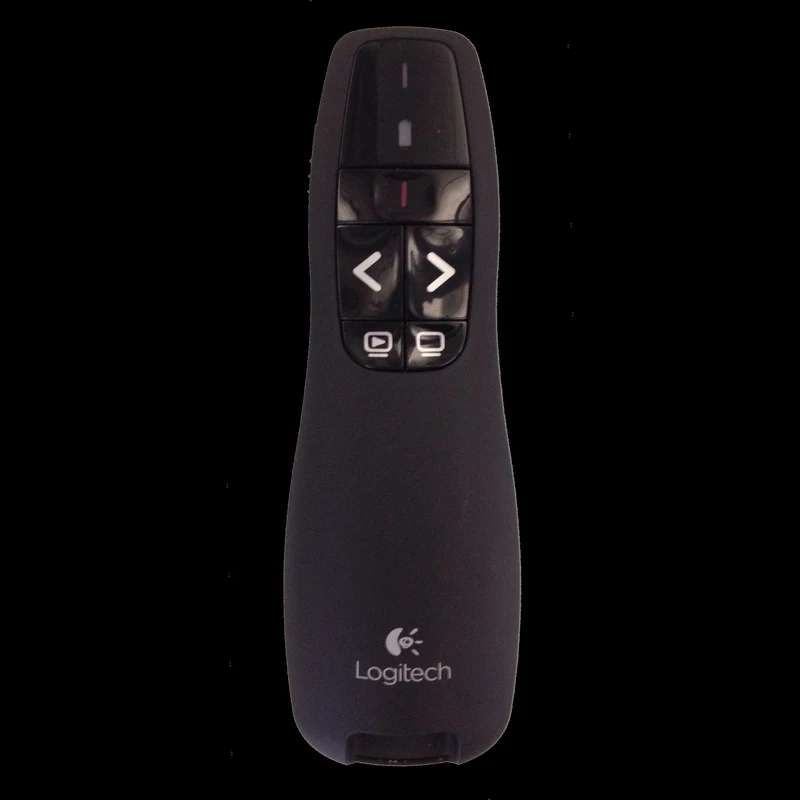
Logitech Wireless Presenter (R400 / R500s Series with Built-In Laser)
Being anchored behind a laptop screen or leaning awkwardly over a keyboard to tap the spacebar ruins executive presence and breaks audience rapport. A dedicated wireless presenter with up to 50 feet (15 meters) of operating range frees you to walk the room, hold eye contact with key stakeholders, and highlight vital data points using the built-in laser. With intuitive tactile buttons, you advance slides seamlessly without glancing down at your hands.
Holding a dedicated wireless presenter in your palm completely transforms room dynamics. You gain the freedom to step away from the podium, move closer to key decision-makers during pivotal strategic reveals, and use the integrated laser to draw immediate focus to key metrics generated in Gamma without blocking the projection beam. Your AI presentations become a stunning cinematic backdrop supporting your personal leadership, rather than a crutch that anchors your hands.
5 Practical Rules to Hook Your Audience and Eliminate Slide Clutter
Generating AI presentations in Gamma solves the speed and layout puzzle; mastering delivery is what secures signed contracts, investor checks, and executive buy-in. As you build your next deck, apply these five battle-tested presentation principles:
- The One-Idea-Per-Card Rule: Never compress three distinct conclusions onto a single slide. If you have three strategic pillars, create three distinct Gamma cards. The marginal cost of generating an extra card with AI is zero, but the cognitive clarity gained by your audience is priceless.
- Showcase Metrics with Oversized Stat Callouts: Human memory quickly discards fifteen-row financial tables, but readily remembers bold numeric markers. Use Gamma’s oversized metric blocks to feature stats like ‘+34% Efficiency’ or ‘$1.2M Saved’ in high-contrast typography.
- Open with a Human Conflict Narrative: Before unveiling technical solutions, anchor your presentation with the struggle of a real human being—the stressed operations lead, the overwhelmed client, or the team battling missed deadlines. Human brains release oxytocin when processing narrative tension, dramatically increasing receptivity to analytical solutions.
- Apply Guy Kawasaki’s 10/20/30 Standard: Venture capitalist Guy Kawasaki famously established that the optimal pitch deck contains 10 slides, takes no more than 20 minutes, and never uses fonts smaller than 30 points. With Gamma, your cards adhere to these clean readability standards out of the box.
- Feed Prompts from Your Personal Knowledge Base: Just as we explored in our deep-dive on building a smart reading second brain with AI, the highest-quality slide content originates from your own curated highlights and meeting notes. Feed Gamma authentic insights from your personal knowledge base to craft AI presentations that are impossible for competitors to replicate.
Frequently Asked Questions About AI Presentations and Gamma App
Is Gamma App free to use or does it require a paid subscription?
For professionals just starting with AI presentations, Gamma offers a generous free tier with initial AI credits capable of building and editing dozens of full slide decks, documents, and interactive webpages. For heavy daily users who generate decks continuously, require custom web domains, or wish to remove the small footer badge, the ‘Plus’ and ‘Pro’ subscription tiers offer affordable monthly plans.
Can I export my Gamma presentation to Microsoft PowerPoint (.pptx)?
Yes. With a single click in the export panel, you can convert your entire deck into native Microsoft PowerPoint (.pptx) format or high-resolution PDF. All text remains fully editable, and card elements map cleanly into standard slide formats compatible with Google Slides and Apple Keynote.
Do AI presentations built in Gamma work well during virtual Zoom or Google Meet calls?
They work exceptionally well. When delivering AI presentations during virtual video calls, Gamma features an interactive ‘Present mode’ directly in your browser with fluid transitions and responsive controls. Sharing the browser tab ensures clients experience smooth animations and interactive media embeds without the performance lag common to bulky desktop presentation files.
Why use a dedicated wireless presenter instead of a smartphone clicker app?
Using smartphone apps to control slides in executive meetings introduces unnecessary risk: mobile screens lock automatically after idle periods, personal notifications can flash on the display shattering your composure, and flat touchscreens offer zero physical feedback, forcing you to look down repeatedly. A dedicated Logitech presentation remote connects via plug-and-play USB radio frequency with zero Wi-Fi dependencies, features raised physical buttons you can feel blindly, and runs for months on a single battery.
By pairing the generative speed of Gamma App with thoughtful storytelling and confident stage mechanics, building AI presentations ceases to be an exhausting weekend chore and becomes a formidable professional advantage. How many hours did you spend last week aligning text boxes and hunting down stock photos in PowerPoint? Have you tried generating an executive deck with Gamma, or are you still battling empty slide templates? Leave a comment below and share your experience with AI presentations with our growing community!