
Imagine waking up, brewing a fresh cup of coffee, and opening an app where an intelligent assistant already organized your day, drafted your morning emails, and gave you a dinner recipe based on the three random ingredients in your fridge. Sounds futuristic? It is actually far simpler than you think. Learning how to use ChatGPT in daily life transforms tedious, repetitive chores into effortless, high-leverage habits. In this beginner-friendly guide, we are cutting through the technical jargon to give you practical, actionable techniques you can implement before your morning coffee cools down.
Whether you consider yourself tech-savvy or a complete beginner who gets overwhelmed by complex apps, this guide is designed for you. We will walk through everything from basic setup to everyday shortcuts so you can naturally weave artificial intelligence into your personal and professional routines.
Why Learning to Use ChatGPT in Daily Life Changes Everything
At its core, ChatGPT is a conversational AI partner that communicates like a knowledgeable colleague. It answers complex questions, summarizes dense documents, drafts correspondence, and debugs messy problems in seconds. However, the real game-changing value does not come from using it as an occasional novelty; it happens when you integrate it as a trusted daily copilot.
Consider this: instead of spending twenty minutes browsing ad-heavy cooking blogs trying to figure out what to make for dinner, you simply tell ChatGPT what ingredients you already have and get a customized 15-minute meal plan. According to workplace research published by OpenAI and MIT economists, knowledge workers utilizing generative AI complete tasks up to 40% faster while delivering higher overall quality.
Yet, many beginners walk away disappointed simply because they enter vague commands. Let’s start with the essential fundamentals: how to set up your account properly in under five minutes.
How to Start Using ChatGPT in 5 Easy Steps
Getting started requires zero coding and zero installation of complicated desktop software. Here is the straightforward setup process:
- Create a Free Account: Head to the official ChatGPT website and click “Sign up”. You can authenticate instantly using your Google, Apple, or Microsoft account.
- Enter Your First Real Prompt: Avoid testing it with generic greetings like “hello”. Instead, test a concrete problem: “I have chicken breast, rice, garlic, and frozen peas. Suggest a quick, healthy dinner recipe I can cook in 20 minutes.”
- Organize Useful Threads: Rename and pin key conversations in your left sidebar for distinct areas of your life, such as “Work & Correspondence” or “Weekly Meal Planning”.
- Enable Contextual Memory: Inside Settings > Personalization, toggle “Memory” on so ChatGPT remembers persistent preferences, such as dietary restrictions, writing tone, or family schedule constraints.
- Install the Official Mobile App: Download the official ChatGPT app on iOS or Android. It synchronizes your chat history seamlessly and provides a hands-free voice mode perfect for dictating thoughts while on the go.
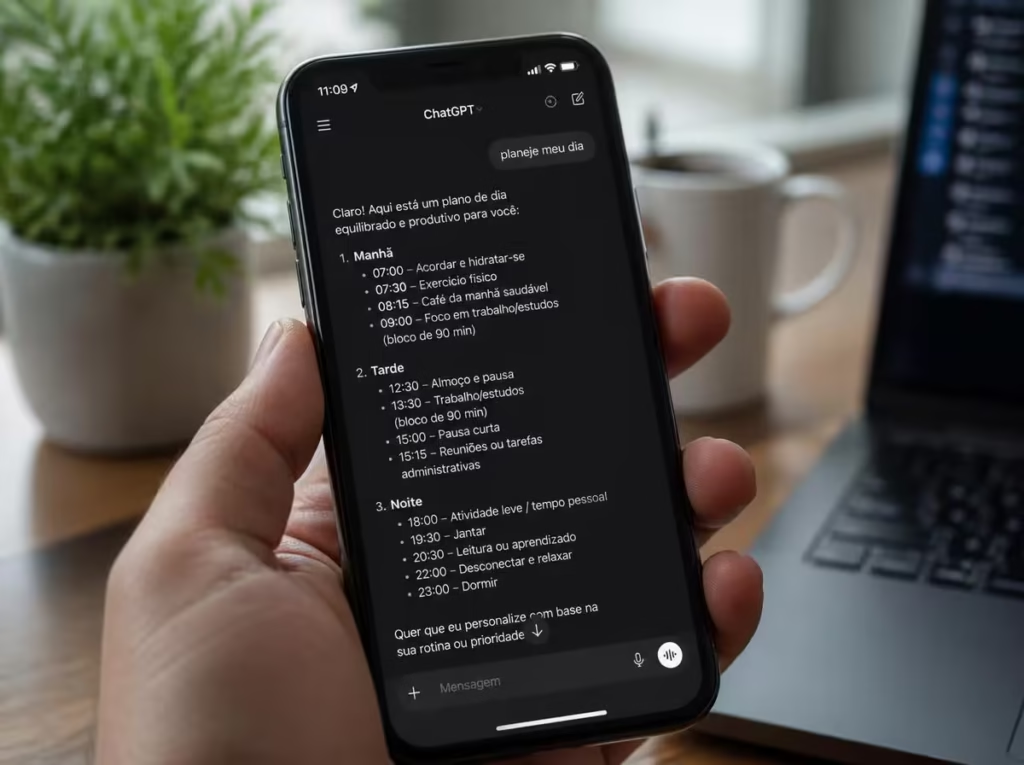
Household Management: Practical Daily Prompts for Home and Family
The best place to build confidence when you use ChatGPT in daily life is right inside your household routines. Here are high-impact ways to delegate daily friction:
Smart Grocery Shopping: Rather than wandering aimlessly through supermarket aisles, prompt the model: “Build a budget-conscious weekly grocery list for a family of 4 with a $150 limit, prioritizing high-protein meals and fresh seasonal produce.” It delivers an organized list categorized by supermarket aisle.
Eco-Friendly Cleaning Solutions: Ask: “How do I clean stubborn mineral buildup from a stainless steel kettle using only natural pantry ingredients?” You get a clear, step-by-step vinegar and lemon protocol without toxic chemicals.
Copy-and-Paste Morning Kickoff Prompt:
Good morning! Help me build a focused, realistic morning itinerary. I wake up at 7:00 AM, want to do a 20-minute bodyweight workout, eat a healthy breakfast, and knock out my 3 most urgent priorities before lunch. Include realistic time estimates and brief motivational check-ins.If you enjoy structuring your day with precision, be sure to explore our complete framework on how to organize your routine with AI in 10 minutes to protect your personal hours from overwhelm.
Workplace Acceleration: Freeing Up Hours Every Single Week
Inside the office or home workspace, deciding to use ChatGPT in daily life pays exponential dividends. Mundane communication that once took forty-five minutes can now be drafted in seconds.
Need to handle difficult client correspondence? Simply instruct: “Draft a polite, professional reply to a customer whose shipment was delayed by 48 hours, acknowledging their frustration, offering a 15% discount on their next order, and maintaining a warm, reassuring tone.”
| Routine Task | Example Prompt | Estimated Time Saved |
|---|---|---|
| Drafting Difficult Emails | “Write a respectful follow-up to a colleague requesting overdue project feedback” | 15 to 20 minutes |
| Creative Brainstorming | “Give me 10 engaging hooks for an email newsletter about remote work wellness” | 25 minutes |
| Basic Spreadsheet Formulas | “Provide an Excel formula to calculate the average sale excluding blank rows” | 10 minutes |
| Meeting Note Synthesis | “Summarize these raw meeting notes into key decisions and assigned action items” | 20 minutes |
If you want to understand the technological foundations behind how language models process human intent, take a look at our foundational breakdown on what is artificial intelligence for beginners.

4 Common Mistakes When Using ChatGPT (and How to Fix Them)
Most people who claim AI doesn’t work for them make one of four classic mistakes. Here is how to easily sidestep them:
- The One-Word Request Trap: Asking “give me ideas” results in generic, soulless answers. Solution: Add constraints: target audience, tone of voice, budget, and desired length.
- Forgetting to Provide Persona Context: The model has no idea who you are unless you tell it. Solution: Specify: “Act as an experienced copywriter” or “Explain this to me as if I were a complete beginner.”
- Treating the First Answer as Final: Prompting is an iterative dialogue, not a Google search. Solution: Ask follow-ups: “Make this punchier,” “Cut the corporate jargon,” or “Organize this into bullet points.”
- Blindly Trusting Critical Facts: AI can occasionally hallucinate dates, citations, or statistical figures. Solution: Always verify key numbers and medical advice before making critical decisions.

Leisure, Travel, and Creative Hobbies with AI
Deciding to use ChatGPT in daily life is not strictly about career efficiency; it also makes your free time considerably richer and more enjoyable.
Personalized Travel Itineraries: Planning a weekend getaway? Prompt: “Create a relaxed 3-day travel itinerary for a couple visiting Savannah, Georgia, focusing on historic architecture, walking tours, and authentic Southern food with moderate walking distances.”
Book & Film Curation: Tired of scrolling endlessly through streaming catalogs? Use this dedicated prompt:
Recommend 5 thought-provoking science fiction novels for a beginner reader. For each book, provide a 2-sentence spoiler-free synopsis and explain why it is worth reading today. Include accessible best-sellers.Frequently Asked Questions (FAQ)
Do I need to pay for a subscription to use ChatGPT in daily life?
No. The free tier of ChatGPT provides comprehensive access to its flagship GPT-4o model, which is more than capable of handling daily scheduling, meal planning, correspondence drafting, and creative brainstorming at zero cost.
Does ChatGPT save my private conversations?
By default, yes, chat history is stored to allow you to review previous conversations. However, you maintain complete control: you can delete specific chats at any time or disable model training under Account Settings > Data Controls.
Is it safe to share personal information with ChatGPT?
For everyday tasks like fitness schedules or meal plans, it is completely safe. However, as standard digital safety practice, never enter sensitive personal identifiers, such as social security numbers, banking passwords, or unredacted medical records.
Can ChatGPT communicate naturally in multiple languages?
Yes. ChatGPT is fluent in dozens of languages, including English, Portuguese, Spanish, and French. You can seamlessly switch languages mid-conversation or ask it to translate documents while preserving cultural nuance.
“Technology is at its best when it frees your mind from administrative friction so you can invest your energy into what truly matters.”
— Minha Dose de IA Editorial
How do you plan to use ChatGPT in daily life starting this week? Which routine chore do you wish you could hand over to AI right now? Share your thoughts in the comments below—I read and respond to every message!